If Xfinity Stream keeps logging you out or sends you back to the sign-in page after you enter your password, the cause is almost always a broken session token. That token can break because of stale cookies, an old bookmark, a privacy extension, a corrupted app cache, a network check that fails, or a problem on Xfinity’s side. Start by clearing Xfinity’s cookies and signing in from the plain xfinity.com/stream address, not a saved bookmark. That one step fixes most browser loops.
Below you’ll find fixes for every common setup: Chrome, Firefox, Edge, Safari, Roku, Fire TV, Apple TV, Samsung and LG smart TVs, Xumo, iPhone, iPad, and Android. You’ll also learn how to tell whether the problem is on your end or Xfinity’s, so you don’t waste an hour troubleshooting an outage.
Quick Overview
| What You See | Most Likely Cause | First Fix to Try |
| Logged out every time you switch tabs or close the browser | Cookies blocked or cleared on exit, tracking protection | Allow cookies for xfinity.com and comcast.net |
| Sign in works, then bounces straight back to the sign-in page | Old bookmark or deep link, corrupted session data | Delete the bookmark, clear Xfinity cookies, sign in at xfinity.com/stream |
| “You’re already signed in as…” then back to sign-in | Incomplete Xfinity ID or account setup | Confirm your Xfinity ID, reset your password, or contact Xfinity Support |
| TV app accepts the activation code, then asks again | App cache, device firmware, or activation not registering | Uninstall the app, restart the device, reinstall, activate again |
| Signs out saying you’re not on your home network | In-home network check failing | Restart the gateway and reconnect the device to your Xfinity Wi-Fi |
| Started suddenly on every device at once | Xfinity outage or backend issue | Check the Xfinity Status Center and wait it out |
Why Does Xfinity Stream Keep Logging Me Out?
Xfinity Stream logs you out when your device can’t keep or prove a valid sign-in session. When you sign in, Xfinity stores a token in your browser or app. Every page load and every stream checks that token. If the token is missing, blocked, outdated, or rejected, you get kicked back to the sign-in screen.
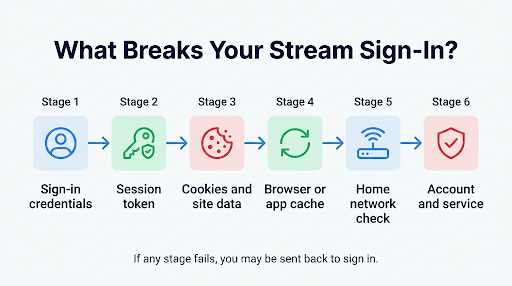
Here are the usual reasons that happens:
- Blocked or auto-deleted cookies. Strict privacy settings, “clear cookies on exit,” or third-party cookie blocking can wipe the token. Xfinity sign-in passes through more than one domain, including comcast.net, so blocking either one can break the session.
- Old bookmarks and deep links. A bookmark that points to a page deep inside Stream (like /stream/home) can carry an expired redirect. Users on the Xfinity Community Forum and Mozilla Connect have reported that switching to the clean root address stopped the loop.
- Ad blockers and privacy extensions. Tools like uBlock Origin, Privacy Badger, or Ghostery can block the background scripts that keep you signed in.
- Corrupted app cache. On smart TVs and streaming sticks, stale app data can make the app forget you every time the TV turns off.
- Failed in-home network check. Some live channels and features only work on your home Xfinity network. If that check fails, certain devices sign you out or block content.
- Account or Xfinity ID problems. An incomplete Xfinity ID, a recent password change, or a plan change can stop credentials from syncing.
- Browser updates. A new browser version can change how cookies or scripts behave. In late 2026, Firefox users on Mozilla Connect reported constant logouts after an update, while the same accounts worked in Chrome.
- Backend issues at Xfinity. Sometimes nothing is wrong on your end. Forum threads from October 2026 show many users suddenly getting logged out several times a day, even with “Stay signed in” checked.
Is Xfinity Stream Down or Is It Just You?
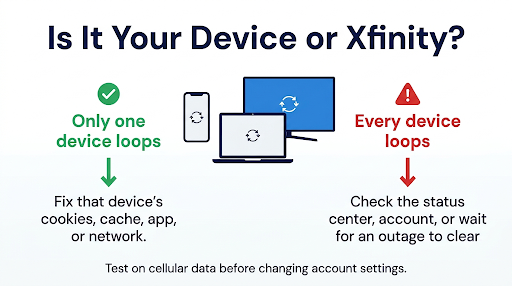
Check this first, because it saves time. If the problem started suddenly on every device in your home, it’s probably on Xfinity’s side.
- Open the Xfinity Status Center and sign in to see outages for your address.
- Try Xfinity Stream on a second device, like your phone on cellular data.
- Look at the Xfinity Community Forum for new threads posted the same day.
If two different devices on two different connections both loop, stop troubleshooting your hardware. Wait a few hours or contact Xfinity. If only one device or one browser fails, keep reading.
How Do You Fix the Xfinity Stream Sign-In Loop in a Web Browser?
Clear Xfinity’s site data, allow its cookies, turn off blockers for the site, and sign in from a clean URL. Do these in order and test after each one.
1. Delete Your Old Xfinity Bookmark
- Delete any saved Xfinity or Stream bookmark.
- Type xfinity.com/stream directly into the address bar.
- Sign in fresh.
- Once you’re in and streaming works, create a new bookmark from that page.
Common mistake: people clear cookies, then open the same old bookmark and get the same loop. Always test with a typed address first.
2. Clear Cookies and Cache for Xfinity Only
You don’t need to wipe your whole browser. Clear data only for these sites:
- xfinity.com
- comcast.net
- comcast.com
Chrome: Click the icon to the left of the address bar on xfinity.com, choose Site settings, then Delete data. Repeat for comcast.net.
Edge: Go to Settings, then Cookies and site permissions, then Manage and delete cookies and site data, then See all cookies and site data. Search “xfinity” and “comcast” and delete them.
Firefox: Click the shield or lock icon next to the address, then Clear cookies and site data.
Safari on Mac: Go to Safari, Settings, Privacy, Manage Website Data. Search “xfinity” and “comcast” and remove them.
Close every browser window, reopen the browser, and sign in again.
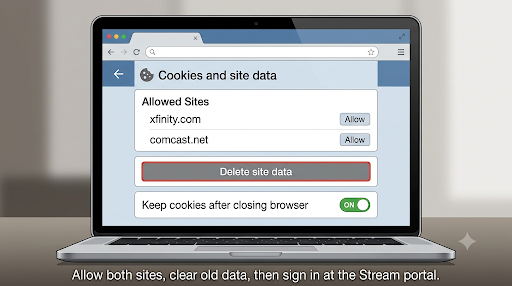
3. Allow Cookies and Stop Clearing Them on Exit
If you get logged out every time you close the browser, your browser is probably deleting cookies on exit. Add xfinity.com and comcast.net as allowed sites.
- Chrome: Settings, Privacy and security, Third-party cookies, then add both sites under “Allowed to use third-party cookies.”
- Firefox: Turn off Enhanced Tracking Protection for xfinity.com from the shield icon. Then go to Settings, Privacy & Security, Cookies and Site Data, Manage Exceptions, and allow both sites. If “Delete cookies and site data when Firefox is closed” is on, add exceptions for them.
- Edge: Add both sites under “Allow” in Cookies and site permissions. If tracking prevention is set to Strict, add an exception for Xfinity.
- Safari: If “Prevent cross-site tracking” causes problems, test with it turned off briefly, then turn it back on after you confirm the cause.
4. Turn Off Ad Blockers and Privacy Extensions for Xfinity
Pause uBlock Origin, AdBlock, Ghostery, Privacy Badger, and similar extensions on xfinity.com. Also try a private or incognito window. If Stream works there, an extension or stored data is the problem.
5. Update or Switch Browsers
Xfinity lists supported browsers and versions on its Xfinity Stream website requirements page. Make sure your browser is current. If Firefox or Safari keeps logging you out after an update, test Chrome or Edge. If one works and the other doesn’t, the issue is browser compatibility, not your account.
6. Check Multiple Displays and AirPlay on Mac
Some Mac users on Apple Community found that Stream stopped loading or signing in after connecting a second display or AirPlay device. Disconnecting the extra display, clearing Xfinity’s website data, and signing in again helped in those cases.
How Do You Fix Xfinity Stream Logging Out on a Smart TV or Streaming Device?
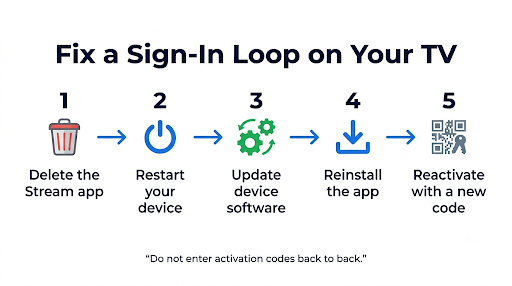
Fully reset the app’s stored data, restart the device, and activate again. A quick close-and-reopen rarely fixes a true loop.
Roku
- Highlight the Xfinity app on the home screen, press the * button, and choose Remove channel.
- Go to Settings, System, Power, System restart.
- Check for updates under Settings, System, System update. Xfinity says Roku devices need firmware version 11.0 or higher.
- Reinstall the Xfinity app and choose Sign In.
- Go to xfinity.com/authorize on your phone or computer and enter the six-digit code.
If the code is accepted but the TV goes back to the activation screen, wait a minute before retrying. Entering codes back to back can create overlapping sessions. Xfinity’s Roku activation guide covers the full process.
Amazon Fire TV and Fire Stick
- Go to Settings, Applications, Manage Installed Applications, Xfinity Stream.
- Choose Force stop, then Clear cache, then Clear data.
- Unplug the Fire TV for 60 seconds.
- Open the app and sign in again.
Apple TV
- Uninstall the Xfinity Stream app.
- Go to Settings, Network, and choose your Wi-Fi. Forget the network, then reconnect to your Xfinity home Wi-Fi.
- Restart the Apple TV and reinstall the app.
Apple TV users often hit a loop where the app says they aren’t on their Xfinity home network even when they are. Reconnecting to the network usually clears that.
Samsung, LG, and Other Smart TVs
Samsung TV owners on the Xfinity forum have reported that the app works after a reinstall but loops again the next time the TV turns off. If that sounds familiar, try this:
- Delete the Xfinity app.
- Unplug the TV from the wall for at least 60 seconds. This clears memory better than the remote’s power button.
- Update the TV’s software.
- Reinstall and sign in.
- On Samsung, turn off Instant On (in General settings on many models) so the TV fully restarts the app.
Xumo Stream Box
Restart the box from settings, then unplug it for 60 seconds. Sign out of the Xfinity app, sign back in, and update the box’s software if an update is waiting.
How Do You Fix Xfinity Stream Logging Out on iPhone, iPad, or Android?
Update the app, clear its data or reinstall it, and make sure your sign-in verification is going to the right phone.
- iPhone and iPad: iOS doesn’t let you clear app cache directly. Delete the Xfinity Stream app, restart the device, and reinstall it from the App Store.
- Android: Go to Settings, Apps, Xfinity Stream, Storage. Tap Clear cache, then Clear storage, and sign in again.
- Low storage: If your phone is almost full, the app may not save sign-in data. Free up some space.
- Background App Refresh: On iPhone, make sure it’s on for Xfinity Stream so the session can refresh.
Verification codes going to someone else’s phone? If you use a household member’s account, Xfinity may send sign-in codes to the primary account holder’s phone. That makes frequent sign-outs extra annoying. The primary account holder can create a separate user ID for you so codes go to your own number.
Can Your Network or Gateway Cause Xfinity Stream Sign-Outs?
Yes. Xfinity checks whether you’re on your home network for some live channels and features. If that check fails, you may be signed out or blocked.
- Restart your gateway. Unplug the Xfinity gateway or router for 60 seconds, then plug it back in.
- Turn off your VPN. A VPN makes your connection look like it’s coming from somewhere else.
- Check custom DNS. Custom DNS settings on your router or device can interfere with location checks. Test with automatic DNS.
- Review Advanced Security. Some users report that Xfinity Advanced Security on the gateway blocked sign-in traffic. Pause it briefly in the Xfinity app to test, then turn it back on.
- Use the Xfinity gateway’s Wi-Fi. A third-party mesh system or a second router can sometimes confuse the in-home check.
If you’re traveling, some content just isn’t available. This guide on how to watch Xfinity Stream outside your home network explains what works away from home and why some channels disappear.
What If You See “You’re Already Signed In” and Then Get Sent Back?
This loop usually means something is wrong with your Xfinity ID, not your device. The app sees a valid sign-in but can’t link it to your TV service.
Try these steps:
- Confirm your Xfinity ID is fully set up. Sign in at xfinity.com and check that your profile is complete. Xfinity forum staff have pointed to a missing Xfinity ID as a cause of this exact loop.
- Change your password. Xfinity support agents often suggest this. A new password forces new tokens on every device.
- Sign in with your email or mobile number instead of your username, or the other way around.
- Check your TV plan. If you recently changed plans, the system may not have synced. A message saying you don’t have Xfinity TV access is a sign of this.
- Contact Xfinity Support if none of this works. Ask them to check your account’s Stream entitlements and refresh your services.
Rogers Xfinity users in Canada: Your sign-in runs through MyRogers. Make sure you can sign in at rogers.com first and that your gateway is set up, because that’s where many Rogers Xfinity loops start.
Which Other Xfinity Stream Errors Show Up With Sign-In Problems?
Sign-in loops sometimes come with an error code. The code tells you more than the loop does, so write it down. If you see one, these guides cover the specific fixes:
- Xfinity Stream error TVAPP-00101
- Xfinity Stream error TVAPP-00166
- Xfinity Stream error TVAPP-00907
- “Upgrade failure, please restart” message on Xfinity Stream
How Do You Stop Xfinity Stream From Logging You Out Again?
Once you’re back in, a few habits keep you signed in longer:
- Check “Stay signed in” every time you sign in on a browser.
- Keep permanent cookie exceptions for xfinity.com and comcast.net.
- Bookmark xfinity.com/stream, not a show or channel page.
- Keep your browser, TV software, and Xfinity app updated.
- Avoid signing in on many devices at the same time if you don’t need to.
- Don’t reset your password from several devices at once. It invalidates sessions everywhere.
Watch out for fake support numbers. Search results for this problem include pages listing “Xfinity Stream support” phone numbers that don’t belong to Comcast. Only contact Xfinity through xfinity.com/support, the Xfinity app, or the number on your bill.
Frequently Asked Questions
Why does Xfinity Stream log me out every time I switch tabs?
Your browser is likely blocking or isolating Xfinity’s cookies. Firefox’s Enhanced Tracking Protection and strict cookie modes in other browsers can do this. Add exceptions for xfinity.com and comcast.net, then sign in again.
Why does Xfinity Stream ask me to sign in every day on my Roku?
Daily sign-outs on Roku usually point to an app or firmware problem, not your password. Remove the channel, update Roku’s software, restart, and reactivate. If it continues on more than one Roku, report it to Xfinity, because device-wide issues sometimes need a fix on their end.
Does Xfinity Stream work better in Chrome than Firefox?
Often, yes. Many users have reported Stream sign-in problems in Firefox that don’t happen in Chrome or Edge, especially right after a Firefox update. Stream works in Firefox, but its stricter privacy defaults need more adjusting.
Will changing my Xfinity password sign me out everywhere?
Yes. Changing your password ends existing sessions, so every device will need a fresh sign-in. That’s why it can fix a loop. It forces every device to get a new, clean token.
Can too many devices cause Xfinity Stream to sign me out?
It can. Xfinity limits how many devices can stream or hold downloads at once. If you’re over the limit, remove old devices under Settings, then Devices, in the Stream app or website.
Why does Xfinity Stream log me out on my iPad but not my phone?
Each device keeps its own session. An outdated iPadOS version, a full storage drive, or a different Wi-Fi network can affect one device and not another. Update the iPad, reinstall the app, and make sure it’s on your home Xfinity Wi-Fi.
Is the Xfinity Stream logout problem fixed yet?
Not completely. Reports of sudden logouts kept appearing on the Xfinity Community Forum through October 2026. If the fixes above don’t work and many other users are reporting the same thing, it’s likely a server-side issue that Xfinity has to resolve.
Final Recommendation
Start with the step that matches your setup. On a computer, delete your bookmark, clear Xfinity and Comcast cookies, allow them permanently, and sign in at xfinity.com/stream. On a TV or streaming stick, uninstall the app, unplug the device for a full minute, update it, and reactivate. On any device, restart your gateway and turn off any VPN.
If you get the “already signed in” loop, or the problem hits every device at once, the cause is probably your Xfinity account or an outage. Check the Xfinity Status Center, change your password, and contact Xfinity Support with the exact error message and the device you’re using. That detail gets you to a real fix much faster.