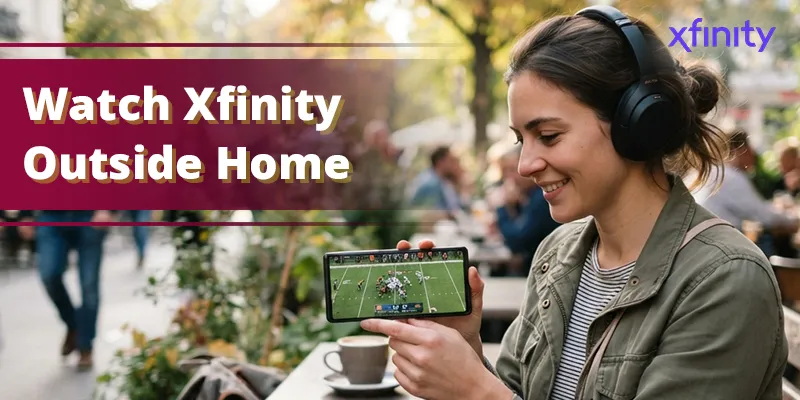
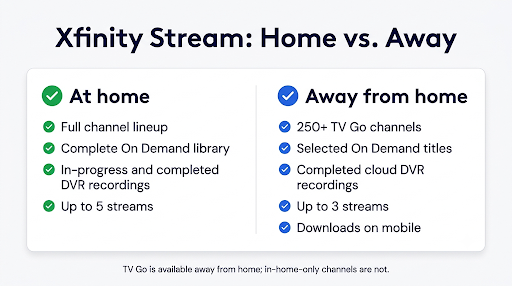
You can watch Xfinity Stream outside your home network by signing in to the Xfinity Stream app on your phone or tablet, or going to the Xfinity Stream portal in a web browser, and picking a TV Go channel, an On Demand title, or a finished cloud DVR recording. Your full channel lineup only works on your in-home Xfinity network. Away from home, you get a smaller lineup of 250+ live channels plus a big On Demand library.
The catch is the device. Phones, tablets, computers, and Amazon Fire TV work away from home. Roku, Samsung, LG, Apple TV, and Xumo TV do not. This guide shows you exactly what works, what doesn’t, and how to fix the “Out of Home” error when it pops up.
Quick Overview
- Best way to watch on the go: Xfinity Stream app on iPhone, iPad, or Android, or the Xfinity Stream portal on a PC or Mac browser.
- What you can watch away from home: 250+ TV Go live channels, tens of thousands of On Demand titles, completed cloud DVR recordings, and downloads.
- What you usually can’t watch: Some local channels, regional sports networks, and any network not labeled TV Go.
- Big-screen options: Cast from your phone with Chromecast or AirPlay, or use the Xfinity Stream app on an Amazon Fire TV device.
- In-home only devices: Roku, Samsung Smart TV, LG TV, Apple TV, and Xumo TV.
- Stream limit: Up to 3 devices at once away from home (up to 5 at home).
- Outside the U.S.: No streaming, but downloaded shows still play offline.
Why Does Xfinity Stream Work Differently Away From Home?
It comes down to licensing. When you’re on your in-home Xfinity network, Xfinity treats the app like a cable box, so you get every channel in your TV package. Once you leave that network, Xfinity can only stream networks where it has an out-of-home deal with the programmer.
That out-of-home lineup is called TV Go. According to Xfinity, more than 250 channels can be livestreamed out-of-home through the mobile app and portal. Popular picks like ESPN, CNN, TNT, TBS, Bravo, AMC, and SyFy are usually on the list, but your exact lineup depends on what’s in your TV package.
Here’s a detail many people miss: “out of home” means off your own Xfinity network, not physically away from your house. If your phone is on cellular data, a neighbor’s Wi-Fi, a VPN, or a public xfinitywifi hotspot, the app treats you as out of home even if you’re sitting on your couch.
How Do You Watch Xfinity Stream Away From Home? (Step by Step)
The steps are almost the same on every supported device. Here’s the fastest way to start watching live TV outside your house.
- Download the Xfinity Stream app from the App Store or Google Play. On a computer, go to xfinity.com/stream instead. No install is needed in a browser.
- Sign in with your Xfinity ID and password. Use the primary account or a user account tied to the Xfinity TV subscription.
- Connect to any internet connection. Hotel Wi-Fi, mobile data, a friend’s Wi-Fi, or an Xfinity WiFi hotspot all work for TV Go.
- Open Live TV and look for channels marked TV Go.
- Use the filter in the guide and choose TV Go Channels (sometimes shown as “Available Out of Home”) to hide channels you can’t play.
- Tap a channel to start watching. If you pick an in-home-only channel, the app will often switch you to that network’s TV Go stream automatically when one exists.
Tip: Bookmark your favorite TV Go channels before a trip. It saves you from scrolling through grayed-out channels on a slow hotel connection.
Which Devices Can Stream Xfinity Outside Your Home?
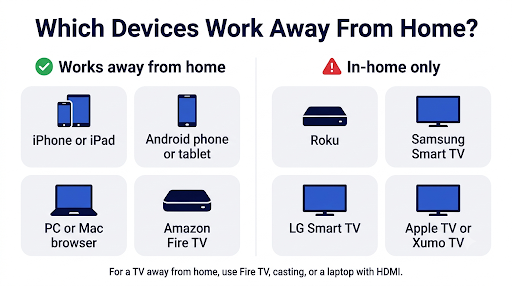
This is where most confusion starts. Xfinity Stream runs on many devices, but only some of them work off your home network. Xfinity’s own device list marks Roku, Samsung, LG, Apple TV, and Xumo TV as “available in-home only to Xfinity TV customers with internet.”
| Device | Works Out of Home? | What to Know |
| iPhone and iPad | Yes | TV Go live channels, On Demand, cloud DVR, and downloads |
| Android phones and tablets | Yes | Same features as iOS, including downloads |
| PC or Mac web browser | Yes | Use xfinity.com/stream; downloads are not available on computers |
| Amazon Fire TV and Fire TV Stick | Yes (supported models) | Xfinity lists Fire TV as an out-of-home option for TV Go |
| Chromecast or AirPlay casting | Yes | Cast from the mobile app to a hotel or vacation-home TV |
| Roku TV and Roku players | No | In-home Xfinity network only |
| Samsung Smart TV | No | In-home Xfinity network only |
| LG Smart TV | No | In-home Xfinity network only |
| Apple TV | No | In-home Xfinity network only; use AirPlay from an iPhone instead |
| Xumo TV and Xumo Stream Box | No | Tied to your in-home Xfinity service |
How to Watch Xfinity Stream on a TV Away From Home
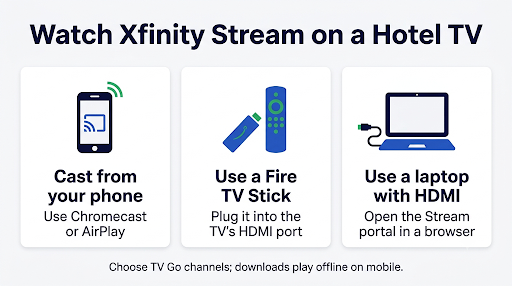
If you want the big screen at a hotel, Airbnb, or second home, you have three real options:
- Cast from your phone. Start a TV Go channel in the mobile app, then tap the Cast or AirPlay icon. This works on any TV with built-in Chromecast, a Google TV device, or an AirPlay-compatible TV.
- Bring an Amazon Fire TV Stick. It’s small, cheap, and one of the few TV devices that supports out-of-home Xfinity streaming.
- Use an HDMI cable. Plug a laptop into the TV and play the Xfinity Stream portal in your browser.
Can You Watch Xfinity Stream on Roku Away From Home?
No. Packing your Roku stick for vacation won’t help, because the Xfinity Stream app on Roku only works on your in-home Xfinity network. You’ll usually see a message like “This device can only access Xfinity Stream on your in-home Xfinity WiFi.” The fix is to switch to your phone, cast to the TV, or use a Fire TV device instead.
If you get that same message on a Roku while you’re actually at home, that’s a different problem. Our guide to fixing Xfinity Stream error TVAPP-00101 walks through the activation and network checks that usually clear it.
What Can You Watch on Xfinity Stream Outside Your Home?
You still get a lot. Xfinity says out of the home you can stream more than 250 live channels, manage your DVR, and watch On Demand content. Here’s how each type of content behaves.
| Content Type | At Home | Away From Home |
| Live TV | Your full channel lineup | 250+ TV Go channels in your package |
| Local channels (ABC, CBS, NBC, FOX) | Yes | Certain affiliates only, based on your location |
| On Demand | Full library | Tens of thousands of titles, but not all |
| Cloud DVR recordings | Yes, including in-progress | Completed recordings |
| Downloads | Yes | Yes, offline on mobile |
| Simultaneous streams | Up to 5 | Up to 3 |
Can You Watch Local Channels on Xfinity Stream Away From Home?
Sometimes. Xfinity lets you livestream certain local broadcast affiliates while out-of-home on the iOS app, Android app, and web portal. The key rule is that the affiliate you get depends on where you are when you press play.
For example, Xfinity explains that a customer in Philadelphia who selects NBC will see the local Philadelphia NBC station. If you travel to a city where Xfinity doesn’t have a deal for that affiliate, the channel may not load at all. This is why people often report that ABC, CBS, or FOX disappears on the road, especially during big games.
Sports fans should expect extra limits. Regional sports networks and some nationally televised games are restricted by regional licensing, so a game that plays at home may be blocked when you travel.
Can You Watch Your DVR Recordings Away From Home?
Yes, if you have cloud DVR. Completed cloud DVR recordings stream over the internet from anywhere in the U.S. Open the app, go to Recordings or My Library, and press play. Recordings that are still in progress are generally limited to your home network, so wait until a show finishes recording before you try to watch it on the go.
How Do You Download Xfinity Shows to Watch Offline?
Downloads are the most reliable way to watch Xfinity on a plane, a road trip, or anywhere with weak signal. They only work in the mobile app on iOS and Android.
- Connect to Wi-Fi before you leave (downloads are large).
- Open the Xfinity Stream app and go to Recordings or browse On Demand.
- Open the program details and tap Download.
- Find your saved titles in the Downloads tab.
A few download rules to know, based on Xfinity’s download support page:
- Up to five mobile devices can hold downloaded DVR recordings (two on select TV packages).
- Up to three mobile devices can hold downloaded On Demand programs (two on select packages).
- You can keep up to 50 downloads per device.
- Downloads are automatically returned after 30 days, or when you remove that device from your account.
Warning: Signing out of the Xfinity Stream app deletes your downloads. Never log out right before a flight to “refresh” the app. If you’re stuck in repeated sign-in prompts, sort that out at home first. Our guide on fixing Xfinity Stream when it keeps logging you out covers the common causes.
Can You Use Xfinity Stream Outside the United States?
Not for live TV or On Demand. Xfinity TV content cannot be streamed or downloaded outside the U.S. However, anything you already downloaded to your phone or tablet still plays offline abroad.
If you’re traveling internationally, download shows, movies, and DVR recordings before you leave. Keep the 30-day return window in mind for long trips, and open the app on Wi-Fi now and then so it can stay in sync.
Some people try a VPN to get around this. Xfinity specifically tells customers to make sure they aren’t connected to a VPN when troubleshooting, because a VPN changes how the app sees your location. In practice, a VPN tends to cause more errors, not fewer.
Why Does Xfinity Stream Say “Out of Home” When You’re at Home?
The app says “Out of Home” when it can’t confirm you’re on your own Xfinity Internet network. This happens more often than you’d think, and it’s usually fixable in a few minutes.
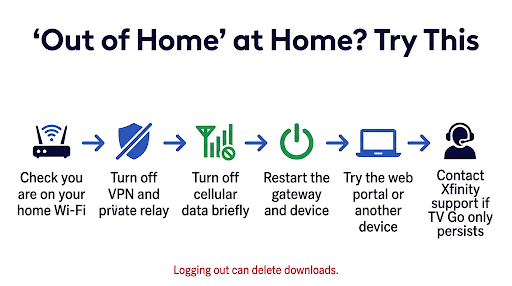
Work through these checks in order:
- Check your Wi-Fi name. Make sure you’re on your own home network, not a neighbor’s Wi-Fi or the public xfinitywifi hotspot. Phones sometimes auto-join the hotspot.
- Turn off any VPN or private relay feature on your phone, laptop, or router.
- Turn off cellular data briefly so your phone can’t switch networks mid-stream.
- Check your router setup. A mesh system or third-party router in front of your Xfinity gateway can sometimes confuse home detection. Third-party internet providers (like AT&T Fiber) will always show as out of home.
- Try a second device or the web portal. If that works, the problem is limited to the first device’s settings.
- Restart your gateway and the device, then reopen the app.
- Log out and back in using Settings > Change Household Account in the app. Remember, this removes downloads.
- Recently moved? Make sure your new address is set as the default account. An old address can make the app think you’re away.
If you only see TV Go channels at home after all of these steps, contact Xfinity support. Agents can send a refresh signal to your account or escalate a persistent “TV Go only” issue.
Does Streaming Xfinity Outside Your Home Use Data?
Yes. At home, streaming runs over Xfinity’s in-home cable service and doesn’t count toward your internet data. Away from home, TV Go streams travel over the internet, so they count against your cellular data or Xfinity Internet data usage.
A two-hour game in HD on cellular can use a lot of data. To keep usage down:
- Use Wi-Fi whenever you can.
- Download shows at home before you leave.
- Check your mobile plan for video quality limits or hotspot caps.
- Use one of Xfinity’s 23 million-plus WiFi hotspots, which are free for Xfinity Internet customers.
Common Mistakes That Stop Xfinity Stream From Working Away From Home
- Bringing a Roku or Apple TV on vacation. They won’t stream Xfinity off your home network. Bring a Fire TV Stick or cast from your phone.
- Trying to watch a non-TV Go channel. Use the TV Go filter so you only see channels that play.
- Signing out before a trip. It erases your downloads.
- Leaving a VPN on. It can block channels even on your home Wi-Fi.
- Hitting the stream limit. Only three devices can stream out of home at once. If a family member is watching in another state, stop one stream in Settings > Manage Devices.
- Using an old app version. Update the app before you travel, while you still have fast Wi-Fi.
Real-World Scenarios: What Should You Do?
You’re at a Hotel and Want to Watch on the TV
Cast a TV Go channel from your phone if the hotel TV supports Chromecast, or plug in a Fire TV Stick. Many hotel TVs block casting, so the Fire TV Stick or a laptop with HDMI is the safer bet.
You Have a Second Home or Vacation Cabin
Xfinity Stream on a smart TV or Roku at a second house won’t unlock your full lineup unless that house has its own Xfinity service. Use a Fire TV device or casting for TV Go channels, or ask Xfinity about service at the second address.
Your Kid Is Away at College
They can sign in on their phone or laptop with a user account under your Xfinity ID and watch TV Go channels, On Demand, and your cloud DVR. Keep in mind the three-stream limit out of home. If their school uses Xfinity On Campus, that’s a separate service with its own rules.
You’re Watching at a Friend’s House
Their Wi-Fi counts as out of home for your account, even if they also have Xfinity. Stick to TV Go channels on your phone, or cast to their TV.
Frequently Asked Questions
Can I use Xfinity Stream at someone else’s house?
Yes, on your phone, tablet, laptop, or a Fire TV device. You’ll get the TV Go lineup, not your full package, because their network isn’t your in-home Xfinity network, even if they’re also an Xfinity customer.
Can I watch Xfinity Stream without home Wi-Fi?
Yes. Mobile data, hotel Wi-Fi, or any public network works for TV Go channels, On Demand, and finished cloud DVR recordings. Downloaded shows don’t need any connection at all.
Why are ABC, CBS, and FOX not working on Xfinity Stream away from home?
Local broadcast streams depend on licensing for the city you’re in at that moment. If Xfinity doesn’t have rights for that affiliate in your current location, the channel won’t play. Xfinity has also acknowledged occasional bugs with local TV Go affiliates, so updating the app can help.
Can Xfinity Internet-only customers use Xfinity Stream on the go?
Yes, but with far less content. Internet-only customers can watch a set of free live channels and free On Demand titles. Your TV Go lineup and DVR access require an Xfinity TV subscription.
How many devices can stream Xfinity outside the home at once?
Up to three. If you get a “too many devices” message, open Settings > Manage Devices in the app or at xfinity.com/stream to see what’s streaming and stop one.
Does connecting to an Xfinity WiFi hotspot count as being at home?
No. The public xfinitywifi hotspot is treated as an outside network. It gives you free internet for TV Go streaming, but it won’t unlock your in-home-only channels.
Do Xfinity downloads expire?
Yes. Downloaded DVR recordings and On Demand titles are returned to the cloud automatically after 30 days. Go back online and download again if you still want to watch.
Final Recommendation
If you want to watch Xfinity Stream outside your home network, use the mobile app or the Xfinity Stream portal, stick to TV Go channels, and download anything you can’t miss before you travel. For TV viewing on the road, a Fire TV Stick or casting from your phone is the most dependable setup. Leave the Roku and Apple TV at home.
Before your next trip, take five minutes at home to update the app, favorite your TV Go channels, and download a few shows. If the app shows “Out of Home” while you’re actually home, run through the Wi-Fi, VPN, and account checks above. That fixes most cases without a call to support.