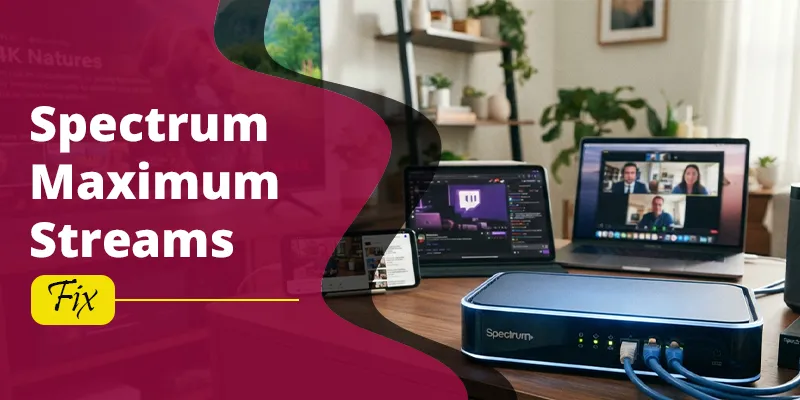
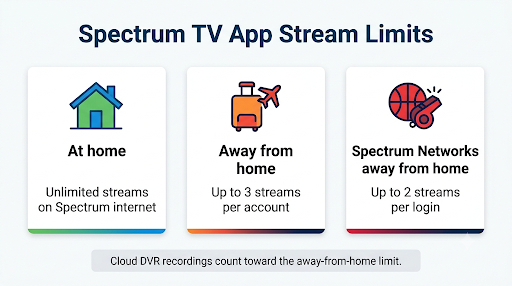
The Spectrum TV App “Maximum Video Streams” error means your account has hit its limit on how many shows can play at the same time. At home on your Spectrum internet, you can stream on as many devices as you like. Away from home, you get only three streams at a time per account, and the fourth device gets blocked with error code XSTVP-1105.
The good news is that this is a limit, not a broken app. Once you know which device is using a stream slot, you can usually fix it in a couple of minutes. This guide covers the exact limits, a step-by-step fix, device-specific tips for Roku, Samsung, Fire TV, Apple TV, Xbox, and phones, and what to do when you see the error at home even though you shouldn’t.
Quick Overview
- What the error says: “XSTVP-1105 – Maximum Video Streams. You’ve exceeded the maximum number of video streams.”
- Why it happens: Too many devices are streaming at once on the same Spectrum login, usually outside your home network.
- In-home limit: No limit on your home Spectrum internet network.
- Out-of-home limit: Three concurrent streams per account.
- Stricter limit: Two streams per login for certain Spectrum Networks content out of home, like SportsNet and SportsNet LA.
- Fastest fix: Stop playback on another device, close the app fully, wait a few minutes, and try again.
- Getting it at home? Your device is probably not on your Spectrum network, or a VPN or mesh router is making it look like you’re away.
What Does the “Maximum Video Streams” Error Mean on the Spectrum TV App?
It means the app counted more active streams on your account than your current location allows. Spectrum’s own error code list describes XSTVP-1105 this way: you’ve exceeded the maximum number of video streams, and to watch the program, you need to stop playback on one of your other devices and try again.
The key thing to understand is that the Spectrum TV App counts streams differently depending on where each device is connected:
- In-home streams are devices connected to the Spectrum internet service at your service address.
- Out-of-home streams are devices on cellular data (4G or 5G), a friend’s Wi-Fi, hotel Wi-Fi, work networks, or any non-Spectrum connection.
So you could have six TVs playing at home with no problem, while a spouse on a phone at the gym, a kid at college, and a parent at a hotel already use all three out-of-home slots. A fourth person outside the house will hit the error.
How Many Streams Does the Spectrum TV App Allow?
The Spectrum TV App allows unlimited streams at home and up to three concurrent streams away from home. Spectrum states this in its Cloud DVR FAQ and its TV Channel Apps FAQ, and its Xbox support page confirms there is no limit on simultaneous streams when you’re streaming in your home.
| Where you’re watching | Stream limit | Notes |
| Home Spectrum internet network | Unlimited | Full channel lineup and features |
| Away from home (cellular data or non-Spectrum Wi-Fi) | 3 concurrent streams per account | Fewer channels and On Demand titles available |
| Spectrum Networks content away from home (certain Spectrum News content, SportsNet, SportsNet LA) | 2 simultaneous streams per set of login credentials | Set in the Spectrum Residential Video Terms |
| Cloud DVR recordings away from home | Counted inside the 3-stream limit | Unlimited at home |
The two-stream rule for Spectrum Networks comes straight from the Spectrum Residential Video Terms and Conditions. That same document says Spectrum may change out-of-home access rights at any time, so treat these numbers as current, not permanent.
Watch out for this one: if you’re trying to watch a Dodgers or Lakers game on SportsNet LA or SportsNet while away from home, you can see a stream limit message with only two people watching. That’s not a bug. It’s the lower limit for those networks.
Why Am I Getting the Maximum Video Streams Error?
Most of the time, one of these is the cause:
- Someone else is watching away from home. Family members on phones, tablets, or laptops outside the house all count toward the three-stream limit.
- A device was left playing. A TV in a vacation home, a tablet in a backpack, or a laptop with SpectrumTV.net open in a browser tab can keep a stream active.
- The app was minimized, not closed. On phones and streaming sticks, the app can keep a session alive in the background.
- A stream slot hasn’t been released yet. After you stop watching on one device, it can take a few minutes before the account frees up that slot.
- Your login is being used outside your household. Spectrum’s terms say household guests may only access the service while in the account holder’s home. If your password was shared widely, those streams add up fast.
- Your device thinks it’s away from home. A VPN, a phone on cellular data, or certain router setups can make an in-home device count as out of home.
- You’re watching a network with its own limit. Some channels and partner apps set their own session caps (more on this below).
How Do You Fix the Spectrum TV App Maximum Video Streams Error?
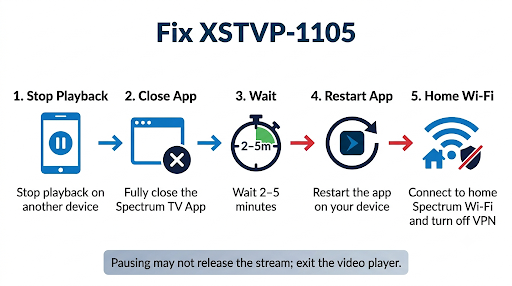
Free up a stream slot, then restart the app on the device you want to use. Follow these steps in order. Most people only need the first three.
- Stop playback on another device. Ask anyone in your household who’s watching away from home to pause and exit the show. Pausing alone may not release the stream, so have them back out of the video player.
- Fully close the app on unused devices. Don’t just press Home. Force-close it (device steps are below). Also close any browser tabs running SpectrumTV.net.
- Wait two to five minutes. Give the account time to release the closed session before you try again.
- Restart the Spectrum TV App on your device. Close it completely, reopen it, and start the program again.
- Connect to your home Spectrum Wi-Fi if you’re at home. Check your phone or tablet isn’t on cellular data. Turn off any VPN.
- Restart the device itself. A full power cycle clears stuck sessions and cached login data.
- Sign out and sign back in. This refreshes your login session. If signing back in throws a new error, see our guide to fixing Spectrum TV App sign-in errors.
- Change your Spectrum password if you suspect sharing. If streams are being used and nobody in your home knows where, update your password on Spectrum.net and sign back in on your own devices.
- Contact Spectrum. If none of this works, call Spectrum at 855-757-7328 and mention the error code XSTVP-1105 so they can check your account.’
How Do You Close the Spectrum TV App on Each Device?
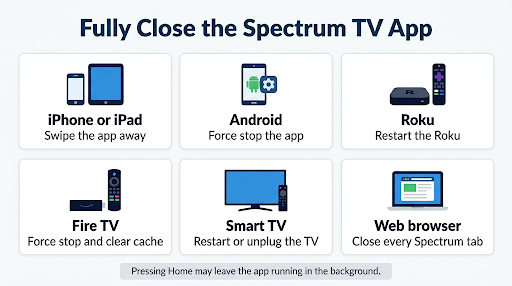
Fully closing the app is the step people skip most often, and it’s the one that usually frees the slot. Here’s how to do it on popular devices. Menu names can vary a little by model and software version.
| Device | How to fully close or reset the app |
| iPhone or iPad | Swipe up from the bottom and pause (or double-click the Home button on older models), then swipe the Spectrum TV App card up and off the screen. |
| Android phone or tablet | Go to Settings, then Apps, then Spectrum TV, and tap Force stop. Tap Storage and Clear cache if the error keeps coming back. |
| Roku | Press Home to exit, then restart the Roku from Settings, System, Power, System restart. If the issue continues, remove the Spectrum TV channel and add it again. |
| Amazon Fire TV | Go to Settings, Applications, Manage Installed Applications, Spectrum TV, then select Force stop and Clear cache. |
| Samsung Smart TV | Hold the power button on the remote until the TV turns off and back on. For a deeper reset, unplug the TV for two minutes. |
| LG Smart TV | Turn the TV off, unplug it for about a minute, then plug it back in and reopen the app. |
| Apple TV | Double-press the TV or Home button on the remote, then swipe up on the Spectrum TV App to close it. |
| Xbox | Highlight the Spectrum TV App, press the Menu button, and choose Quit. |
| Google TV and Android TV | Go to Settings, Apps, Spectrum TV, then select Force stop. The Spectrum TV App launched on Google TV and other Android TV OS devices in April 2026. |
| Web browser (SpectrumTV.net) | Close every tab playing Spectrum video, or quit the browser completely. |
Tip: On Roku, Samsung, and other smart TVs, pressing Home often leaves the app running quietly in the background. A restart is the most reliable way to make sure the stream is really gone.
Why Do I Get Maximum Video Streams at Home?
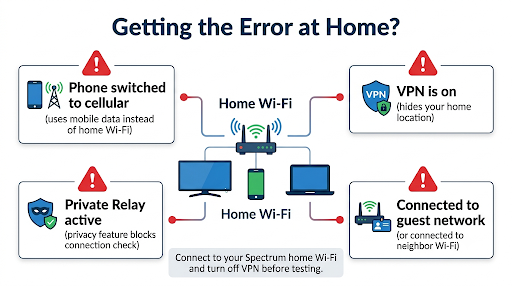
If you’re home and still seeing XSTVP-1105, your device is most likely being treated as out of home. Since in-home streaming has no limit, this error at home almost always points to a network detection issue, not too many viewers.
Check these common causes:
- Your phone switched to cellular. Weak Wi-Fi in a bedroom or backyard can push your phone onto 5G without you noticing.
- A VPN is on. A VPN hides your home connection, so the app sees you somewhere else. Turn it off while you watch.
- iCloud Private Relay or similar privacy features. On some Apple devices, these can mask your network. Try turning Private Relay off for your Wi-Fi network if you use it.
- You’re on a different network. A neighbor’s Wi-Fi, a guest network from another provider, or a work hotspot doesn’t count as your Spectrum home network.
- A mesh system or third-party router is causing trouble. Some users with mesh Wi-Fi report the app working away from home but failing on their home network. Restarting the modem and router, or testing with a device plugged straight into the Spectrum modem, helps you narrow it down.
If the app also shows a message that it thinks you’ve left the house, follow our walkthrough on the Spectrum TV App “We See You’re Away From Home” message. The fixes overlap, and solving that detection problem usually clears the stream limit error too.
If your home internet itself keeps dropping, the app may fall back to cellular or fail to verify your location. In that case, work through these Spectrum TV App connection error fixes first.
Is “Maximum Video Streams” the Same as “Maximum Sessions Limit Reached”?
Not exactly. They look similar, but they come from different places.
- XSTVP-1105 Maximum Video Streams is a Spectrum TV App error tied to your Spectrum account’s stream limit.
- “Maximum sessions limit reached” or “You’ve exceeded the maximum number of streaming sessions” usually shows up in a network’s own app, such as Spectrum News or a TV Everywhere channel app you signed into with your Spectrum login. Spectrum News, for example, tells you to sign out of one of your other sessions and try again.
Partner apps can set their own rules. For example, Spectrum’s HBO Max help page notes a maximum of three devices can stream at once. Users in streaming forums have also reported certain cable networks capping sessions on their own, separate from Spectrum’s limit. If you only get the error on one channel or one network app, that network’s limit is the likely cause.
What Mistakes Make the Error Keep Coming Back?
A few habits cause repeat trouble:
- Pausing instead of exiting. A paused show can still hold a stream slot.
- Retrying instantly. Hitting play again and again right after closing another device rarely works. Wait a few minutes.
- Leaving a laptop tab open. SpectrumTV.net in a forgotten browser tab is easy to miss.
- Sharing the login outside the house. Every outside viewer eats into the three away-from-home slots, and it goes against Spectrum’s household rules.
- Forgetting about the vacation home or dorm. A smart TV at a second location is out of home, even if it’s always on Wi-Fi there.
Real-World Examples
Family travel night: Two kids are watching on tablets in a hotel, and a parent is watching the news on a phone in the lobby. That’s three out-of-home streams. When the other parent opens the app on a laptop, they get XSTVP-1105. One person closing their stream fixes it.
Game day: You and a friend are both away from home watching a Lakers game on SportsNet using your login. A third person tries to join and gets blocked, even though the general limit is three. SportsNet’s two-stream rule is why.
At home with a VPN: Your laptop runs a VPN for work. The Spectrum TV App sees a non-Spectrum location and counts it as out of home. If three family members are already watching elsewhere, your laptop gets the error. Turning off the VPN fixes it.
Frequently Asked Questions
Can I increase the number of streams on the Spectrum TV App?
No. Spectrum doesn’t currently offer a paid add-on to raise the out-of-home limit. The only way to get unlimited streams is to watch on your home Spectrum internet network.
How long does it take for a stream slot to free up?
Usually a few minutes after the other device fully exits the video. If it’s still blocked after 10 minutes, restart the device that was streaming before, since the app may still be running in the background.
Do Cloud DVR recordings count toward the stream limit?
Yes, when you watch them away from home. Spectrum’s Cloud DVR FAQ says you get unlimited streams at home and up to three simultaneous streams outside your home, so recordings and live TV share the same out-of-home slots.
Does the error mean someone hacked my Spectrum account?
Not usually. In most cases a family member is just watching somewhere else. But if you see the error often and can’t match it to anyone in your household, change your Spectrum password and sign back in on your own devices.
Does the Xumo Stream Box count toward the stream limit?
A Xumo Stream Box at your home on Spectrum internet counts as in-home, which has no limit. If you take it to another location with different internet, it would be treated as out of home like any other device.
Why does the error show only on Roku or Samsung TV but not my phone?
Smart TVs and streaming players often keep the app running in the background, and some can be on a different network band or a mesh node. Restart the TV, confirm it’s on your Spectrum Wi-Fi, and reinstall the Spectrum TV App if the issue stays on that one device.
What Should You Do Next?
Start simple. Close the Spectrum TV App on any device you’re not using, wait a few minutes, and reopen it on the device you want. If you’re away from home, remember the three-stream cap, or two for SportsNet and certain Spectrum News content.
If you’re at home and still see Maximum Video Streams, focus on your network: turn off any VPN, make sure you’re on your Spectrum Wi-Fi, and restart your modem and router. If the error still won’t clear, call Spectrum at 855-757-7328 with error code XSTVP-1105 ready.